Pulse,
Claude's heartbeat

He reacts to what you burn, right in your macOS menu bar.

Pulse at rest
This month · burned
$0of $20000%
~0 tokens *

That's the idea. 🔥

You just burned $2000 for fun.
Now track your real usage. At a glance.

Click or hold to burn 🔥  ·  poke Pulse to react* ≈ $1 / 800K tokens avg

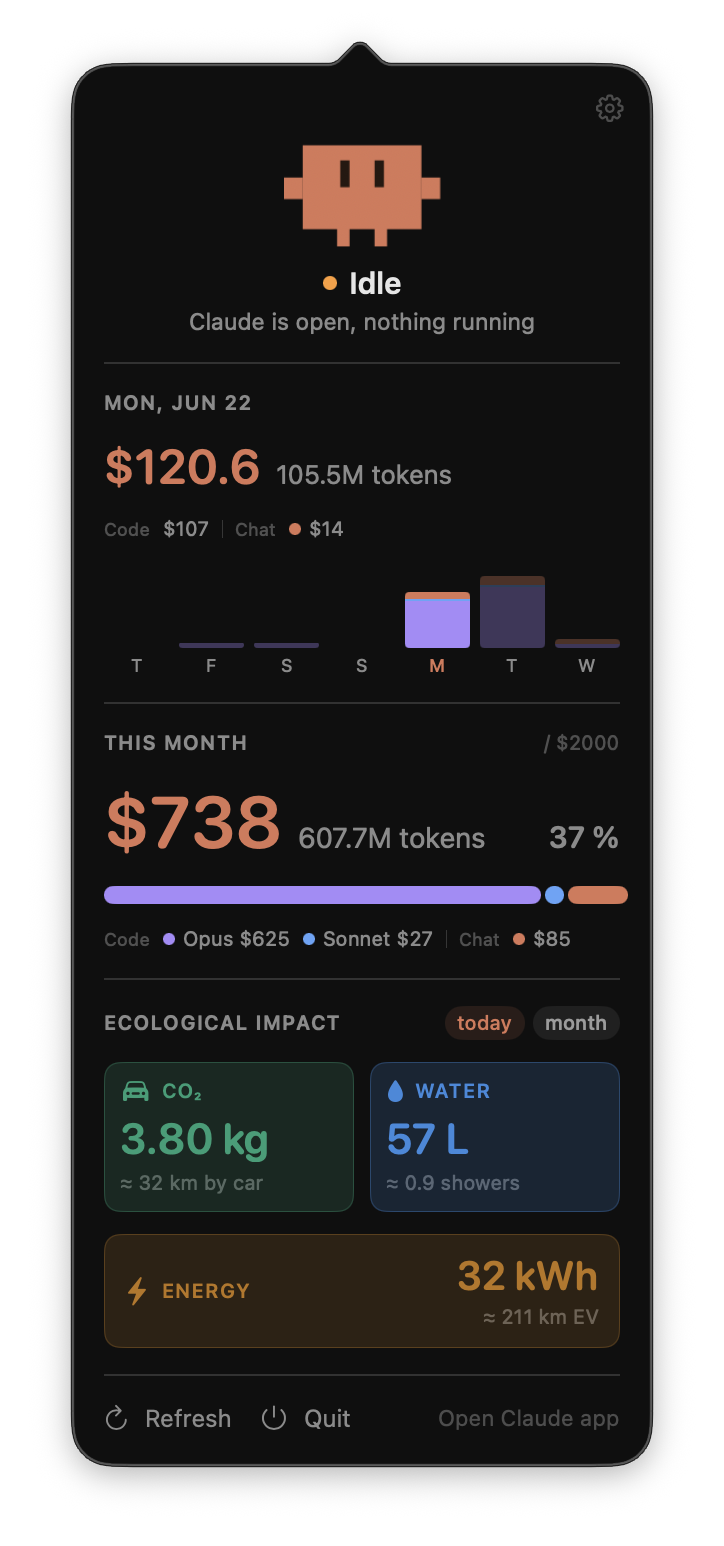
Pulse for Claude — real panel
Try him

Always on.
Always watching.

Always there
Lives in your menu bar

One click opens the panel. He never gets in the way, but he's always watching.

Reacts to you
Feels every token you burn

Idle when you're idle. Hyper when you're burning. At 80%, he starts sweating.

Knows when to wave
Waves when Claude goes quiet

When Claude stops mid-session without finishing, Pulse waves. Every 5 min until you come back.

Eco-conscious
Knows your impact on the planet

CO₂, water, energy, estimated on-device from your real token count. In everyday terms.

Questions for Pulse.

Does the app read my Claude conversations?
No. Never. It reads the .jsonl files Claude Code writes locally: only token counts and model names. Content never touched, never stored, never sent anywhere.
What happens when I connect to claude.ai?
An in-app private browser (sandboxed WKWebView) opens. Pulse reads two numbers: amount spent + monthly limit. That's all. Session cookies stay inside the sandbox; Swift never sees them.
Does any data leave my Mac?
Nothing. No server, no telemetry, no analytics. The only network call is the one-time claude.ai sync, and even that is optional. Daily tracking is 100% local.
What's stored on my Mac?
Only in UserDefaults: amount spent, monthly limit, calibration. And in ~/.claude-pulse/daily-log.json: Claude Code cost per day. No auth tokens, no keys, no conversation data.

What's new.

v2.0.6 Jul 2026
  • Fix: today's total could crash mid-day — claude.ai's own usage API always lags a bit on the current day. Pulse used to trust that lagging number outright, which could make today's total suddenly drop — sometimes close to $0 — right when a background sync landed. Pulse now only lets real account data correct today's total upward, never downward.
v2.0.5 Jul 2026
  • Fix: menu bar total could freeze on a stale number — the menu bar text only updated on a 2-second timer, disconnected from the panel's own data. If a background sync landed between ticks, the day rolled over, or the timer simply missed a beat, the panel would already show the correct number while the menu bar stayed frozen — sometimes for hours. The menu bar now updates the instant the underlying data changes, same as the panel.
v2.0.4 Jul 2026
  • Fix: menu bar total could go stale for hours — left running unattended overnight, macOS App Nap could throttle Pulse's background refresh, freezing the menu bar number until you clicked it. Pulse now stays out of App Nap.
v2.0.3 Jul 2026
  • Fix: today's Chat could still show a phantom number — even after v2.0.2, a leftover "reconstruct chat from the total" calculation could dump an unrelated gap (the same "Other" the monthly view already shows) into today's Chat. Pulse now only shows today's Chat once claude.ai has actually published it — no more guessing.
  • Fix: the monthly total could get visually clipped — with certain amounts, the big number at the top of "This month" could get cut off mid-digit.
v2.0.2 Jul 2026
  • Fix: monthly breakdown could be way off — Chat sometimes showed a much bigger number than reality, because it was calculated as "leftover" instead of pulled from your real account data. Now uses the exact numbers from claude.ai.
  • Fewer "Timed out" sync errors — the sync was pulling more data than before and needed a bit more time to breathe.
  • New "Other" category when your total doesn't fully add up to the known products — instead of hiding the gap (yes, even claude.ai's own dashboard has one), Pulse shows it honestly.
  • Freshest numbers when you open the panel — if the last sync is more than 5 minutes old, Pulse quietly refreshes before showing you the total.
v2.0.1 Jul 2026
  • Fix: today's total was wrong — the daily cost & chips could show a noticeably lower number than your real spend. Now uses the exact number straight from your account whenever it's available, same for the 7-day chart.
v2.0 Jul 2026
  • New name, new face — Clawd Pulse becomes Pulse for Claude, with a brand-new pixel octopus mascot: bigger eyes, rosier cheeks, wobbly tentacles.
  • Heat colors — Pulse's body shifts along a heat ramp with your usage: soft coral at rest, ember when busy, flames flickering from his crown when he's on fire. 🔥
  • Set your own "normal day" — tell Pulse what a typical day costs you, right in Settings, and his mood scales to your own pace instead of a one-size-fits-all number.
  • Calmer notifications — clicking a "Claude needs you" alert now just brings Claude Desktop forward if it's open, instead of jumping somewhere unexpected.
v1.5 Jul 2026
  • Real daily numbers — on Enterprise/Team accounts, Clawd now reads your exact daily cost & tokens straight from claude.ai (Code, Chat, Claude in Chrome). No more estimates where the data exists.
  • Smarter chat estimate — when today isn't finalized yet, the fallback math got a lot tighter.
  • More accurate ecological impact — uses exact token counts whenever available, chat included.
  • All usage limits shown — personal Pro/Max accounts now see every session/weekly bar the claude.ai dashboard shows.
v1.4 Jul 2026
  • Usage limits fallback — on plans without a dollar total (personal Pro), Clawd now shows your session & weekly % limits instead of a blank message.
  • Smarter ecological impact — chat-only accounts get a cleaner monthly view, and "no usage yet" replaces confusing zeros.
v1.3 Jun 2026
  • Ecological impact — CO₂, water & energy footprint of your sessions. On by default.
  • Month history — navigate past months with ‹ › arrows.
  • Connect / Disconnect — clean webkit session management; button shows "Connect" when signed out.
  • Icon-only mode — turn off cost + tokens in Display to show just Clawd in the menu bar.
  • Settings cleanup — tighter layout, clearer labels.
v1.2 Jun 2026
  • Update notifications — Clawd holds a sign with the new version number when a newer release is out. Banner in the panel, dismiss per version, always visible in Settings.
  • Model chips — the cost legend is now colored capsule chips that wrap. Opus (purple), Sonnet (blue), Haiku (green), Fable (amber), Chat (coral).
  • All plans supported — Free shows a clear message instead of a broken sync button. Pro/Max sync via the extra_usage API fallback.
  • Claude Design quota — Enterprise users see a dedicated badge when the included quota is in use.
v1.1 Jun 2026
  • Live chat sync — real total (incl. chat) auto-refreshes every 30s. Always up to date.
  • Silence detection — Clawd waves when Claude goes quiet mid-session. Reminds you every 5 min until you come back.
  • Version number in settings panel.
v1.0 Jun 2026
  • First release — Clawd lives in your menu bar, tracks Claude Code spend live, shows your real monthly total (incl. chat) and ecological impact.
Get Pulse

Put him in your
menu bar.

Free. Local. No account. macOS 13+.

.zip · 1 Mo · macOS 13+